

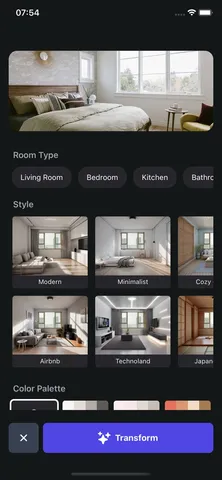
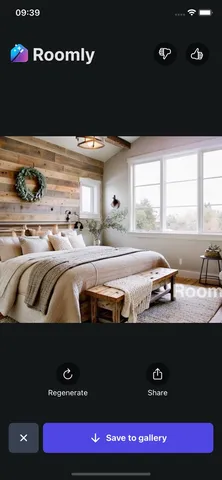

Roomly shows you what a room could look like before you buy a single piece of furniture. Take a photo of your living room, bedroom or kitchen, pick a style, and the AI produces a redesigned version of the same space. It is for homeowners and renters planning a makeover, and for anyone who finds it hard to picture a change from a mood board.
Start from the room you have
Generic inspiration photos are nice, but they show someone else’s house. Roomly works from your own photo, so windows, walls and proportions stay recognizable. That makes it easier to judge whether a sofa style or a darker wall color would actually suit the space.
Styles, palettes or your own words
There are three ways to steer the result. The style library covers looks like Scandinavian, minimalist, farmhouse, boho chic, industrial loft and traditional. Color palettes change the mood of the room without changing its style. If neither matches what you imagine, write a prompt such as “warm wood, green plants, reading corner by the window” and the AI follows it.
Good for
- Comparing two or three directions before a renovation
- Trying different furniture and decor ideas without moving anything
- Showing a partner or a designer what you mean
- Virtual staging for rentals and property listings
Each result can be saved and shared, which makes it easy to collect opinions before you commit to anything.
Roomly is available on iPhone and Android.


