
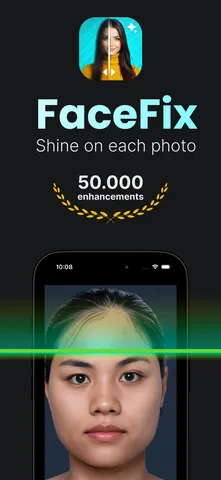

FaceFix app icon

FaceFix

Enhance photo quality and fix faces

Photo & AI · Since 2024 · ★ 4.0 (11 ratings)

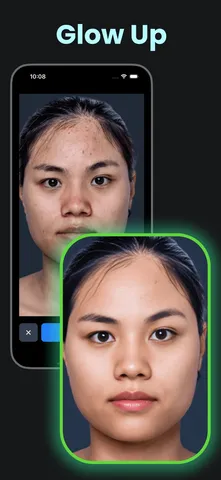
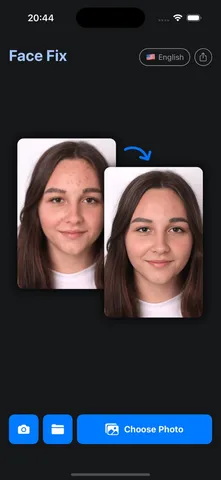
FaceFix screenshot 1FaceFix screenshot 2FaceFix screenshot 3FaceFix screenshot 4

FaceFix improves portraits. It sharpens blurry or low-resolution photos, restores old family pictures and cleans up skin in selfies. I built it for people whose best photos are of faces: profile pictures, headshots, group shots from a party, and scans from old albums.

Fix the quality first

Many photos are almost good. A shot taken in low light, a picture sent through a messenger several times, or an old print scanned on a phone often comes out soft. FaceFix runs an AI enhancer over the image to bring back sharpness and detail. It pays the most attention to faces, because that is where people notice blur first.

Retouch the skin

The second part of the app handles skin. It removes acne, pimples, blemishes, blackheads and spots, and smooths texture without wiping out every detail. The goal is a face that still looks like you on a good day, not a plastic filter. That makes it useful for:

Restore old photos

Photos from the last century often have faded faces and lost detail. Take a picture of the print or scan it, then let FaceFix restore it. The results work well for family archives, gifts and memorial pages.

You don’t need any editing experience. Pick a photo, let the AI process it and save the result.

FaceFix is available on iPhone and Android. More details are at facefix.app.

Features

Photo quality enhancement

Make soft or low-quality pictures sharper and clearer, with extra attention to faces.

Old photo restoration

Bring back detail in old, faded or damaged photos, including scans of prints.

Acne and blemish removal

Remove pimples, spots, blackheads and other skin marks from portraits and selfies.

Natural skin retouching

Smooth skin and even out texture while keeping the face recognizable and natural.

FAQ

Is FaceFix free?

FaceFix is free to download on the App Store and Google Play. Some features may require an in-app purchase.

Can FaceFix restore old photos?

Yes. Scan or photograph an old print, open it in FaceFix and the AI improves sharpness and detail, especially on faces.

How is FaceFix different from a general photo enhancer?

FaceFix is tuned for portraits. Besides improving overall image quality, it retouches faces specifically, which helps with selfies, headshots and dating profile photos.

Is FaceFix an alternative to Remini?

Yes. It covers similar ground, enhancing quality and restoring photos, with a stronger focus on face retouching such as acne and blemish removal.

More apps

HeadShotsProfessional AI headshots in seconds
Photo & AI2025
TattooArtAI tattoo design generator
Photo & AI2025
LogusAI logo maker
Photo & AI2025
MemeGenAI meme maker
Photo & AI2025

All 30 apps →