

Background Remover app icon

Background Remover

Remove photo backgrounds in one tap

Photo & AI · Since 2024 · ★ 4.4 (17 ratings)

Background Remover screenshot 1Background Remover screenshot 2Background Remover screenshot 3Background Remover screenshot 4

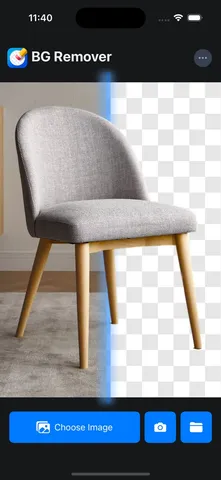
Background Remover takes a photo and gives you the subject without the background. It is aimed at people who need clean images often and don’t want to open a desktop editor each time: online sellers, small shops, social media managers and anyone who needs a quick headshot.

Product photos for marketplaces

Most marketplaces want items on a plain white background. With this app you shoot the product on your kitchen table, remove the background, set it to white and export a JPG. If you list many items, batch mode handles a group of photos at once. For your own website or a design file, export a transparent PNG instead.

When the AI gets it almost right

Automatic cutouts are good with people and objects that stand out from their surroundings. Tricky scenes, such as a white mug on a white wall, can leave a rough edge. The manual touch-up brush fixes that. Choose a brush size, paint back what was lost or erase what should go, and save.

Put something else behind it

Removing the background is often the first step. After that you can place the subject on:

Blur and opacity controls help the new background sit behind the subject without drawing attention.

Background Remover is available on iPhone. More details are at removebg.halpindev.com.

Features

One-tap removal

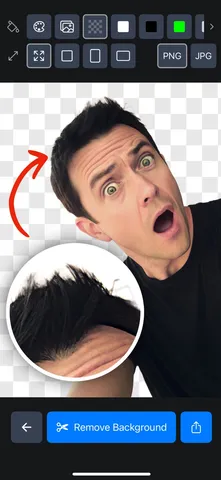
Pick a photo and the AI separates the subject from the background, keeping fine edges such as hair.

Transparent PNG or JPG

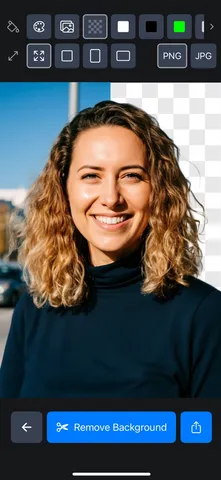
Export the cutout with a transparent background, or as a JPG on a white or custom background.

Manual touch-up

Fix the edges yourself with brush tools in several sizes when the automatic cut misses a spot.

New backgrounds

Replace the background with a solid color, a gradient, a template or your own image, then adjust blur and opacity.

Batch processing

Remove backgrounds from several photos in one go, which saves time when you have a whole product catalog to prepare.

FAQ

Is Background Remover free?

Yes. Background Remover is free to download on the App Store, and exported images have no watermark. Some premium templates and features are available as in-app purchases.

How do I make a photo background white?

Open the photo, let the app remove the background, then choose white as the new background color and save the result as a JPG.

Can I get a transparent PNG?

Yes. Export the cutout as PNG and the background stays transparent, ready to drop into a design or a marketplace listing.

Does it work with hair and complex edges?

The AI is trained to keep fine details like hair. If an edge still needs work, the manual brush lets you add or erase areas by hand.

More apps

HeadShotsProfessional AI headshots in seconds
Photo & AI2025
TattooArtAI tattoo design generator
Photo & AI2025
LogusAI logo maker
Photo & AI2025
MemeGenAI meme maker
Photo & AI2025

All 30 apps →